
File Sharing - SharePoint and OneDrive
A web-based collaboration and storage space, used to create, edit and share content between colleagues. Ideal for collaborating on upcoming projects or as a location to document operational tasks.
- Content accessible anywhere online.
- Upload existing documents or create new documents directly within your library using the Office Online suite.
- Edit documents at the same time using co-authoring.
- Generate lists of data with customisable views and columns.
- Share documents with colleagues outside of Queen Mary
| Self-help Guides | |
|---|---|
| Sharepoint, OneDrive |
Audience: Students, Staff
Service Name: File Sharing
Alias: SharePoint, OneDrive
Key Users: Students, Staff
Requirements: Users of the service must be current students or staff
Requesting the service: The service is automatically available to current students and staff
Status: Current service
Cost: Free to end users
Business Owner: IT Services Assistant Director, Platforms & Service Delivery
Technical Owner: IT Services, Infrastructure Software
Related Services: Microsoft 365
Service Level Category: GOLD
Your general purpose file storage options
What is OneDrive?
OneDrive is Microsoft’s cloud-based file hosting service and it’s provided by default to all Queen Mary University of London students and staff.
Your University OneDrive file store is a OneDrive for Business account; you will get 100GB of storage space as default. It gives you a simple way to store, sync and share all kinds of files with all your devices, and is also accessible via the web.
OneDrive is private by default, however it is possible to share files with other people. This is best suited for sharing with one or two people. If you wish to share with a wider audience, Teams or a SharePoint site is a more appropriate option.
Upon leaving the organisation, your OneDrive will be deleted according to the retention policy. For this reason, it is best not place document on your OneDrive which are intended for long-term group sharing.
What is SharePoint?
SharePoint is a collection of cloud and web-based technologies that makes it easy for groups to create, share and collaborate more effectively. The University’s SharePoint Online can be used to:
- Publish web pages (to share with anyone who has a University account)
- Share and sync files
- Work together on documents at the same time
- Assign tasks and automate reminders
- Track deliverables
- Access files from anywhere with an internet connection
- Invite any user with a University account to collaborate
- Invite an external user to collaborate
- Work on mobile devices
What is Teams?
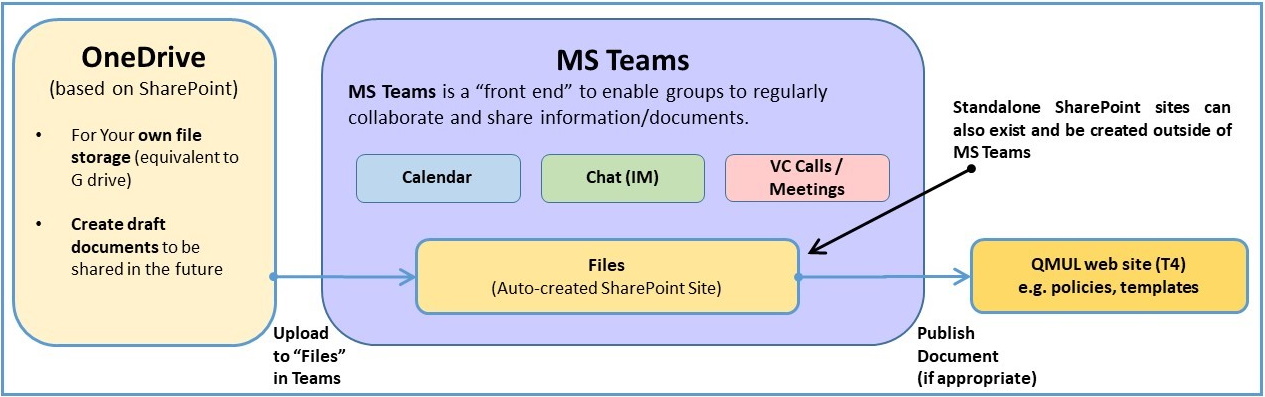
Teams is the University’s recommended and supported online collaboration tool. Teams is integrated with other Microsoft 365 (formerly known as Office 365) products. It brings together everything you need to collaborate with groups of colleagues in one online workspace. As a conduit between OneDrive for Business and SharePoint Online, you can leverage its features inc. Calendar, Chat (IM) and Voice and Video Calls/Meetings to share information and documents.
Typical Document Workflow
Information Classification
Information classification helps to protect Queen Mary’s data, which is critically important in preventing a data breach. It also helps us to comply with various regulations - such as GDPR - and protect our information from unauthorised users.
For full guidance on the classification of data, including other lower classifications, please review Queen Mary‘s Information Classification policy:
DG09 Information Classification [PDF 367KB]
How to access OneDrive, Teams & SharePoint
All users automatically have access to these services, so there is no need to request them. Each can be accessed using your Queen Mary account to log into https://office.com and selecting either OneDrive, Teams or SharePoint from the menu.
More detailed instructions can be found here - https://www.its.qmul.ac.uk/support/digital-workplace/how-to-access-services/
Additional Support
IT Service Desk:
Telephone: +44 (0)20 7882 8888
Email: servicedesk@qmul.ac.uk
Self-service: https://helpdesk.qmul.ac.uk/
Service Desk chat: https://www.qmul.ac.uk/its/
Faculty Relationship Managers:
Email: its-frms@qmul.ac.uk