
Streamlining Large-Scale Poster Assessments: How Dr. Simpson Wong Used Padlet to Transform Workflow at QMUL

Abstract illustration showing how Padlet supports the organisation of large‑scale poster assessments.
Introduction
In the 2025-26 academic year, Dr. Simpson Wong, Lecturer in Mental Health and Co-director of the Public Mental Health MSc at the Wolfson Institute of Population Health (Faculty of Medicine and Dentistry), redesigned the poster presentation assessment workflow for his module, which involves around 160 students organised into 11 groups with 14 internal markers.
Facing long‑standing challenges around file management, marker access, and administrative workload, Simpson sought a more streamlined and reliable approach. He contacted the Technology Enhanced Learning Team (TELT) for guidance on using Padlet to support a secure, group‑based assessment setup. Working with Padlet Lead Wenqing Chen via the Book a Learning Technologist (BALT) service, he adopted Padlet to create a digital space for poster submission, presentation, and marking.
Identifying the Challenge
Previously, students submitted posters as PDF or PowerPoint files via QMplus Turnitin for similarity checking. While effective for academic integrity, this workflow created substantial challenges during the presentation and marking stages, including:
- Markers manually collecting e‑posters and loading files onto classroom computers, causing delays and stress
- Poster display being limited by screen resolution and classroom setup
- Limited opportunities for students to view peers’ posters
- Lack of a centralised space for markers to access posters during marking and moderation
Simpson needed a solution that could scale to a large cohort while keeping each group’s work private and accessible only to relevant students and markers.
Designing a Padlet‑Based Solution
During a 1‑to‑1 TELT consultation, Simpson was introduced to Padlet features such as password‑protected boards, group visibility controls via QMplus, timing settings, and presentation display options. Using Padlet Teacher‑level permissions, a structured and secure setup was implemented.
- Step 1: Maintain Turnitin for similarity reporting.
Students continued submitting posters to Turnitin. Simpson verified submissions and shared similarity scores with markers to preserve existing integrity processes.
- Step 2: Upload to Padlet and organise by group.
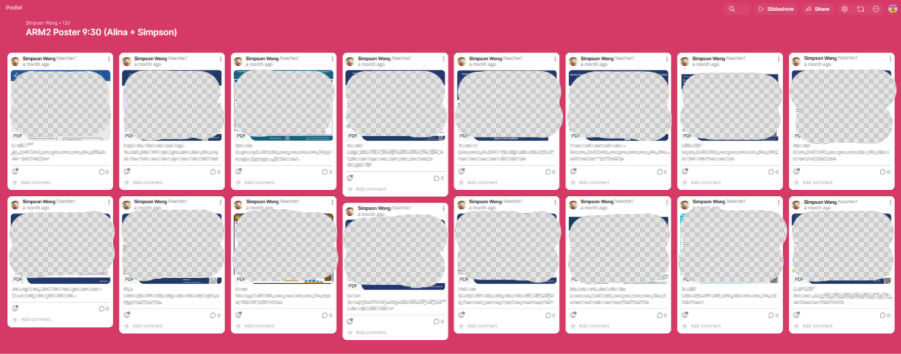
Verified posters were uploaded to 11 separate Padlet boards, one per student group, creating a centralised platform for presentation and marking.
The screenshot shown here illustrates the Padlet layout used for the assessment. All poster content visible in the image has been anonymised, and original student work has been removed. The screenshot is shared with Dr. Simpson Wong’s permission.
- Step 3: Enable secure, device-independent access.
Each board was protected with a unique password shared only with the relevant students and markers. Links were distributed via QMplus, allowing posters to be viewed on any device during and after presentations.
Key benefits of this structure:
- Privacy and control: The multi-board setup with password protection meant each group's work remained private, visible only to peers and assigned markers. No student could access another group's posters.
- Manageable device access: Rather than downloading files onto multiple classroom computers, markers accessed posters in real time on their own devices. With Padlet open alongside other materials, they had immediate access to all student work without the need for additional file management or technical setup within teaching spaces.
- Flexible group management: The system also allowed Simpson to easily reassign posters if students changed groups or presentation slots. Posters could be moved using simple drag‑and‑drop actions, avoiding the need to reorganise files across multiple devices or folders.
Outcomes
The Padlet‑enabled workflow successfully replaced a high‑friction, document‑heavy process with a centralised, easily navigable system.
The new approach allowed:
- Advance preparation: all posters were uploaded ahead of the presentation session.
- Consistent access: students and markers used direct links to view posters.
- Improved presentation quality: posters could be viewed without constraints of classroom screen size or resolution.
- Peer visibility: Students in each group could view each other's posters, enabling peer learning.
- Streamlined marking: markers could access all posters in one place after the session.
- Reduced stress and time savings: for both the module lead and markers.
Feedback from Simpson
“The poster session has now been completed, and I have finished marking over 200 posters. With your introduction of the Padlet function and help setting it up, the poster presentations were very different from last year.
Previously, markers had to load posters onto desktop computers. This year, I was able to prepare everything in advance, which saved time and significantly reduced stress. Students could view each other’s posters using group‑specific links, and posters were no longer restricted by screen size or projection quality.
After the session, markers could easily access all posters for marking and reference. Overall, I found the process highly effective and well organised.”
Student Perspectives
Early student feedback highlighted the value of Padlet as a flexible and accessible platform for engaging with poster work. Students reported that viewing posters on their own devices made it easier to see details that were difficult to read when posters were projected in classrooms, particularly during busy presentation sessions.
One student noted that Padlet was especially helpful for accessing content clearly, explaining that “the key aspect was being able to see details in Padlet that I couldn’t view on the board.” Another student emphasised the benefits of having a single, central platform for accessing posters, describing Padlet as “an effective centralised platform” that supported peer learning and made it easier to engage with others’ work.
While not all students viewed posters beyond their own group, there was a shared sense that wider access could further enhance learning. Students reflected that seeing a broader range of posters would offer useful points of reference for academic poster design and deepen understanding of peers’ research approaches.
Overall, the feedback suggests that Padlet contributed positively to accessibility, clarity, and the peer‑learning experience, while also highlighting opportunities to extend cross‑group visibility in future iterations.
Looking Ahead
Following the success of this approach, Simpson is interested in exploring further enhancements, such as using Padlet’s commenting feature to support post‑presentation Q&A under each poster. At the same time, he emphasises the importance of maintaining in‑person discussion to ensure that technology complements, rather than replaces, live interaction.
Beyond this module, there is scope to scale the workflow across other programmes that use group‑based presentations, develop shared Padlet templates for large cohorts, and create guidance resources for staff interested in using Padlet for assessment. There may also be opportunities to further explore how Padlet integrates with existing QMplus workflows, supporting departments in managing digital poster assessments at scale.
Interested in Using Padlet for Your Teaching?
If you are facing a similar challenge — whether for assignment submission, group work, or class activities — the TELT team would be happy to discuss how Padlet could help. You can book a consultation through the BALT (Book a Learning Technologist) service.
There is also an upcoming training session open to all staff:
Discovering Padlet: Building Engaging and Interactive Teaching The session will cover an overview of Padlet and its different board formats, hands-on exploration of collaborative and sandbox tools, an introduction to AI-powered features, and a Q&A with resources to help you get started.
📅 Date: Wednesday 29 April 2026 🕑 Time: 2:00–3:00pm 💻 Format: Online (1 hour)
👉 Book your place via the CPD site: Padlet Training
About the Technology Enhanced Learning Team (TELT)
The Technology Enhanced Learning Team (TELT) at Queen Mary University of London supports staff and students in making effective use of digital tools for teaching and learning. From platform support and training, to developing online resources and student‑facing guidance, TELT works across the university to enhance the digital learning experience for all.
For TELT support, you can:
- Raise a ticket request via Service Desk
- Join upcoming TELT CPD training sessions
- Speak to the TELT team during AskTELT in 20 drop-in sessions
For the certain Technology’s request, one of our specialists in the team will help you. The team is always happy to discuss ideas and support colleagues who would like to experiment with interactive digital activities in their teaching.
/filters:format(webp)/prod01/channel_262/queen-mary-university-of-london/media/qmul/media/news/items/pr/SML-badge-large.png)
 News story: